31 Purpose-Built Notion Templates for ADHD, Wellness, and Daily Focus
By Lily, Master Crafter & Digital Organizer
Let’s be completely honest—building an organizational system from scratch in Notion can feel like staring at a blank piece of paper. When you are already dealing with ADHD, burnout, or chronic health issues, the absolute last thing you want to do is spend hours setting up complex relational databases just to track your daily habits!
I went through the current lineup of Notion planner templates on Creative Fabrica and aggressively filtered out the ones that just looked pretty. Instead, I pulled together 31 pre-built systems that actually solve highly specific life-management problems. Whether you are trying to rewire your subconscious habits, track your reading goals, or build a neurodivergent-friendly career hub, here is the full breakdown of templates that will genuinely make your life easier!

1. Notion Template ADHD, Notion Life Plan

This template is built specifically for neurodivergent brains. It removes the overwhelming clutter of standard planners and focuses on highly visual, low-friction task capture. It acts as an incredible “second brain” so you don’t have to rely on your working memory.
Lily’s In-Depth Recommendation:
Dopamine Menus: Use the customizable lists to create a “dopamine menu” of healthy, quick activities you can do when you feel under-stimulated.
Brain Dumps: Keep this page open as a pinned tab on your browser to instantly dump random thoughts before they distract you from your main work.
2. Notion Wellness Planner

A focused tool for people who would rather track one part of their wellbeing deeply than manage a dozen loosely connected lifestyle pages. It is one of the more practical, calming picks on this list if you want something you will actually use daily.
Lily’s In-Depth Recommendation:
Holistic Tracking: Log your water intake, sleep quality, and daily moods side-by-side to start noticing clear patterns in your energy levels.
Digital Detox: Use the dedicated tracker to log your daily screen time limits and hold yourself accountable to tech-free evenings.
3. Notion ADHD Planner

Built for heavy, daily use rather than a one-time aesthetic setup, so it holds up beautifully once the initial novelty wears off. It relies on bright color-coding and highly visible progress bars to keep your brain engaged!
Lily’s In-Depth Recommendation:
Time Blindness: Utilize the built-in time-blocking features to assign realistic durations to tasks, helping combat the chronic ADHD symptom of time blindness.
Hyper-focus Hub: Keep a dedicated page for tracking your current hyper-fixations so you can safely indulge in them without losing track of your actual priorities.
4. Notion Booklist Tracker
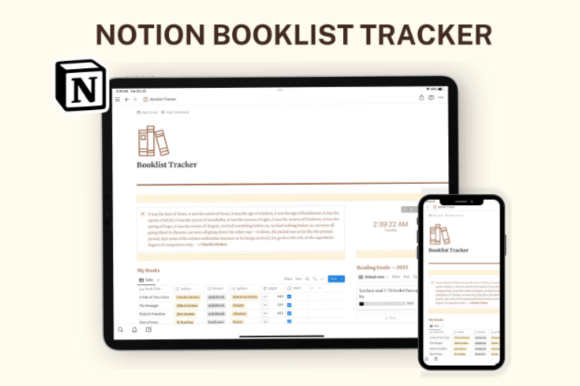
A practical template that supports a specific reading habit instead of trying to be a full life-planner. Worth adding to your Notion sidebar if you are trying to transition away from scrolling your phone before bed.
Lily’s In-Depth Recommendation:
Visual Bookshelf: Upload the cover art for every book you read. Switching the database to “Gallery View” creates a stunning digital bookshelf.
Quote Banking: Use the interior page of each book entry to save your favorite quotes and highlights for easy reference later.
5. Skincare Tracker Notion Template
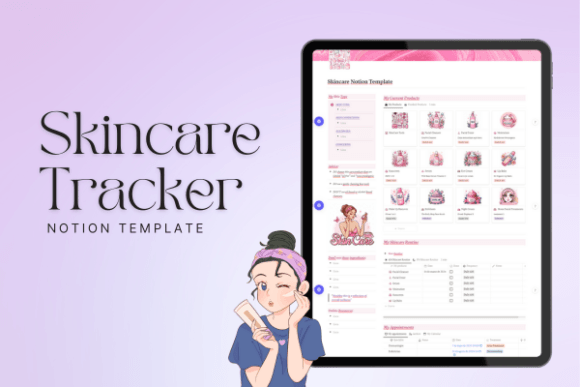
This one keeps things incredibly simple, which makes it easier to actually stick with over a full month. It holds up well over time since the layout tracks your actual product inventory rather than just empty checkmarks.
Lily’s In-Depth Recommendation:
Expiration Dates: The most crucial feature! Log the date you opened that expensive serum so you actually use it before the active ingredients expire.
Routine Sequencing: Organize your products strictly by AM and PM routines so you never mix conflicting ingredients (like Retinol and Vitamin C) again!
6. Notion Astrology Planner, Tarot Journal

Designed with a highly specific, mystical aesthetic. This template is a solid, brilliant option if you have outgrown a plain paper journal and want a searchable database for all your daily readings and cosmic events.
Lily’s In-Depth Recommendation:
Tarot Logs: Upload photos of your daily card pulls and write your interpretations directly underneath. It is amazing to look back and see the accuracy months later!
Lunar Cycles: Track your energy levels and manifestations in alignment with the New Moon and Full Moon phases.
7. Wellness Notion Dashboard, PLR Templates

Because this includes PLR (Private Label Rights), this is an absolute goldmine for digital creators. You can actually modify this incredibly detailed wellness system and resell it in your own Etsy shop!
Lily’s In-Depth Recommendation:
Digital Sellers: Swap out the colors and icons to match your specific brand aesthetic before listing it for sale to your audience.
Coaching Tool: If you are a health coach, duplicate this dashboard for each of your clients so you can track their wellness progress collaboratively in real-time.
8. Nervous System Regulation Notion Template

An incredibly unique, somatic-focused template that fits into an existing Notion setup rather than asking you to rebuild your life. It is designed specifically to help you track somatic exercises and vagus nerve stimulation habits.
Lily’s In-Depth Recommendation:
Anxiety Management: Use the daily check-ins to map out exactly which breathing exercises or grounding techniques actually successfully lower your heart rate.
Therapy Companion: Share these logs with your therapist to provide accurate, unbiased data about your weekly stress spikes!
9. Subconscious Rewiring Journal

This one is aimed at a highly specific morning routine! It works best alongside a broader daily planner, providing a dedicated, distraction-free space for deep shadow work and mindset shifts.
Lily’s In-Depth Recommendation:
Limiting Beliefs: Use the structured prompts to identify and systematically dismantle negative self-talk regarding your career or art business.
Morning Routine: Make this page the very first thing you open on your laptop. Writing out your new empowering beliefs daily is a game-changer.
10. Affirmation Diary – Notion

Built to reduce the mental load of tracking your positivity journey manually. It is not flashy, but it gets the highly specific job of maintaining a gratitude and affirmation practice done without any extra clutter.
Lily’s In-Depth Recommendation:
Mobile Integration: Add a Notion widget directly to your iPhone home screen that links to this specific diary page for easy access when you are feeling anxious.
Quote Banking: Create a gallery view of your favorite aesthetic Pinterest quotes to serve as visual affirmations!
11. Find Your Ikigai Notion Template

This template is built around a single, profound exercise: discovering your life’s purpose (Ikigai). It provides deep, structured journaling prompts to help you align your passions with your career.
Lily’s In-Depth Recommendation:
Career Pivots: If you are feeling stuck in your current job, dedicate a quiet Sunday afternoon to filling out these interconnected databases.
Business Planning: Use your resulting “Ikigai” to write a brand new mission statement for your small craft business!
12. Notion Template ADHD Career

A sharply focused tool for neurodivergent individuals who would rather track their job applications and portfolio assets systematically than manage a dozen messy Google Docs. It is an incredibly practical pick for job hunting.
Lily’s In-Depth Recommendation:
Resume Storage: Keep every single iteration of your resume and cover letter stored here, tagged by industry, so you never accidentally send the wrong version.
Interview Prep: Create a database of common interview questions and write out your “STAR” method answers so you are fully prepared.
13. Notion Fitness Planner Template

Built for heavy daily use in the gym rather than a one-time setup! It holds up beautifully on a mobile screen, allowing you to log your sets and reps seamlessly between exercises.
Lily’s In-Depth Recommendation:
Progressive Overload: Use the tracking tables to ensure you are slightly increasing your weights or reps each week to guarantee muscle growth.
Workout Library: Embed YouTube links to form-check videos directly inside the exercise database pages so you can review them before lifting.
14. Notion Template ADHD Career Template
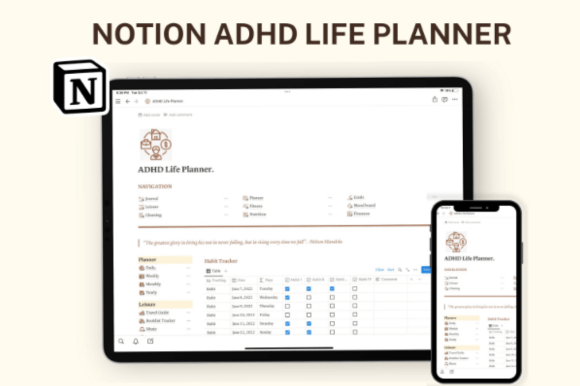
A practical template that supports a specific ADHD-friendly approach to climbing the corporate ladder. Worth adding if you struggle with maintaining focus on long-term professional development goals.
Lily’s In-Depth Recommendation:
Brag Document: Keep a running list of every compliment, successful metric, and completed project you achieve. You will need this ammo for your annual review!
Network Tracking: Stop forgetting who you met at conferences! Log their names and the exact context of your conversation here.
15. Habit Tracker Notion Template

This one keeps things incredibly simple, which makes it easier to actually stick with over a full month. It holds up well because the layout doesn’t rely on a punishing “streak” mechanism that makes you restart from zero if you miss one day.
Lily’s In-Depth Recommendation:
Micro-Habits: Don’t track “Read for an hour.” Track “Read 1 page.” Setting the barrier to entry extremely low ensures you actually check the box.
Visual Rewards: Change the checkbox emojis to something fun (like a sparkling star) to give your brain a tiny dopamine hit upon completion.
16. Notion Habit Tracker

Designed with fewer moving parts than a full wellness dashboard, which makes daily use significantly less of a chore. A solid option if you have outgrown a plain paper checklist but do not need a fully built-out OS.
Lily’s In-Depth Recommendation:
Habit Stacking: Group your habits by time of day (Morning/Evening) so you can stack a new habit directly onto an existing automatic behavior (like brushing your teeth).
Monthly Review: At the end of the month, analyze the data to see which habits you consistently fail at. It might be time to drop them or adjust the goal!
17. Christian Vision Board – Notion Template

This highly visual system is set up so you can start using it the same day you duplicate it. It is a brilliant, reflective pick if generic habit apps never quite matched how you actually approach your spiritual wellbeing and faith goals.
Lily’s In-Depth Recommendation:
Prayer Journals: Create a linked database to track prayer requests for family and friends, alongside updates on how those situations evolve.
Digital Mood Boarding: Use the gallery view to pin encouraging scriptures and aesthetic imagery that aligns with your specific goals for the year.
18. My Writing Hub | Notion Template
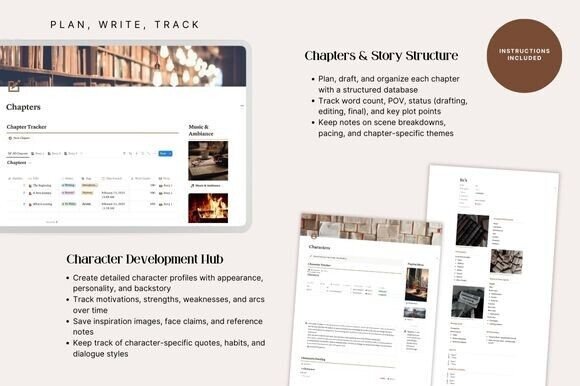
A template that fits effortlessly into a writer’s life! Simple enough to customize in an afternoon, it provides the perfect structured architecture for NaNoWriMo participants, freelance copywriters, or aspiring novelists.
Lily’s In-Depth Recommendation:
World Building: Create dedicated sub-pages for character profiles, magic systems, and location lore so you never create a plot hole again.
Word Count Tracker: Use the progress bar features to visually track your daily word count goals to ensure you hit that 50k mark!
19. Spiritual Mental Health Notion Bundle

This one is aimed at a highly specific, grounding routine, so it works best alongside a broader planner! Easy to duplicate and adjust, it provides a safe, completely private digital space for shadow work and emotional processing.
Lily’s In-Depth Recommendation:
Therapy Notes: Write down key breakthroughs or “homework” assignments from your therapy sessions immediately so you do not forget them by next week.
Trigger Tracking: Log daily events alongside your mood shifts to identify hidden emotional triggers and patterns over time.
20. Notion Fitness Planner Template

Built to reduce the mental load of tracking gym progress manually! It is not flashy, but it gets the highly specific job of logging sets, reps, and progressive overload done without extra clutter on your phone screen while working out.
Lily’s In-Depth Recommendation:
Form Checks: Embed YouTube video links of proper deadlift and squat forms directly into the exercise database so you can quickly review them at the gym.
Measurements: Stop relying entirely on the scale! Use the tracking tables to log body measurements and lift capacities to see your actual physical progress.
21. Habit Tracker Progression Notion Template

This brilliantly visual template focuses entirely on the “progression” aspect of habits. It is a fantastic complement to a broader planner if you want more granular, percentage-based detail in your daily routines.
Lily’s In-Depth Recommendation:
Visual Rewards: The built-in progress rings give your brain an immediate visual dopamine hit when you check off a task!
Pacing: Do not add 10 new habits at once. Start with just three core daily tasks, and only add more once those initial three have turned completely green for a full month.
22. Notion Template ADHD, Life Planner

A focused, highly-structured tool for neurodivergent brains who would rather track their life clearly than manage a dozen loosely connected, overly-aesthetic pages. It is one of the most practical picks on this list for preventing executive dysfunction.
Lily’s In-Depth Recommendation:
Low-Friction Capture: Keep this dashboard as your browser’s homepage so you can instantly dump thoughts without having to click through multiple folders.
Color Coding: Use high-contrast color tags for “Urgent” vs “Important” to force your brain to recognize true priorities.
23. Notion Writer’s Hub

Built for heavy daily drafting rather than a one-time aesthetic setup. It fits naturally next to a daily planner, providing a dedicated sanctuary for your novel outlines, freelance pitches, and character development grids.
Lily’s In-Depth Recommendation:
Submission Tracking: If you submit short stories or articles to magazines, use the Kanban board to track exactly where your pieces are currently pending.
Resource Archiving: Clip web articles, name generators, and writing prompt generators directly into the resource library so you never suffer from writer’s block again.
Frequently Asked Questions About Notion Templates
How do I actually install a purchased Notion template?
It is incredibly easy! Once you purchase the template, you will receive a secret web link (usually in a PDF document). Open that link in your browser, make sure you are logged into your Notion account, and click the “Duplicate” button in the top right corner. The entire system will instantly copy into your private workspace.
Do I need to pay for a premium Notion subscription to use these?
For 99% of personal use cases, absolutely not! All of the templates on this list function perfectly on Notion’s completely free Personal Plan. You only need to upgrade if you are planning to upload massive video files directly into your workspace or collaborating with a large team.
Can I customize the databases after I buy the template?
Yes! That is the beauty of Notion. You can change every single cover image, swap out the icons, recolor the text blocks, and add or delete columns to make the template fit your exact workflow needs. You are not locked into the designer’s original structure.
Final Thoughts on Digital Organization
Please remember: Not every single template on this list belongs in your workspace at the exact same time. Start with whichever one solves the specific planning problem that is causing you the most stress right now. Add the rest only once you have actually established a consistent daily habit with your current system.
A beautifully functioning workspace is a productive workspace. Happy organizing!

Written by Lily
Master Crafter & Digital Organizer
I teach creatives how to bridge the gap between messy, beautiful physical crafts and structured digital businesses. I focus on optimizing digital workspaces, organizing pattern libraries, and proving that productivity tools can be just as aesthetic as your handmade art.
Affiliate Disclosure: This post contains affiliate links to Creative Fabrica. If you click through and make a purchase, I may receive a small commission at no extra charge to you. I only recommend digital assets I trust and use daily in my own Notion dashboard.