23 Purpose-Built Notion Templates for Creatives and Event Planners
By Lily, Master Crafter & Digital Organizer
Let’s be completely honest—building an organizational system from scratch in Notion can feel like staring at a blank piece of paper. It is intimidating! You know the platform is powerful, but spending hours setting up relational databases and linked views takes precious time away from actually doing your creative work.
We dug through the current lineup of Notion planner templates on Creative Fabrica and aggressively filtered out the ones that just looked pretty in screenshots. Instead, I pulled together 23 pre-built systems that actually solve highly specific planning problems. Whether you are launching a YouTube channel, planning a massive wedding, or just trying to manage your social media content calendar, here is the full breakdown, one incredibly useful template at a time!

1. Notion Social Media Planner

This template is built around a single job and executes it flawlessly without extra, distracting pages you will never open. It is a brilliant standalone dashboard for tracking Instagram grids, TikTok ideas, and Pinterest pins in one unified view.
Lily’s In-Depth Recommendation:
Content Batching: Use the board view to move posts from “Idea” to “Drafting” to “Ready to Publish.” It is incredibly satisfying to drag those cards across the screen!
Small Business Owners: Stop guessing what you should post today. Plan out a full month of promotional content in advance so you can focus entirely on making your products.
2. Notion Planner for Creatives

A sharply focused system for people who would rather track their creative projects well than manage a dozen loosely connected life-planning pages. This is one of the more practical picks on this list if you prioritize raw artistic function over heavy database decoration.
Lily’s In-Depth Recommendation:
Pattern Designers: Use the internal project pages to store your sketch iterations, yarn color palettes, and tech-editing notes for every new design you launch.
Commission Tracking: If you take custom orders on Etsy, use this to track client deadlines and shipping dates effortlessly.
3. Notion Planner for Creatives, Cat Themed
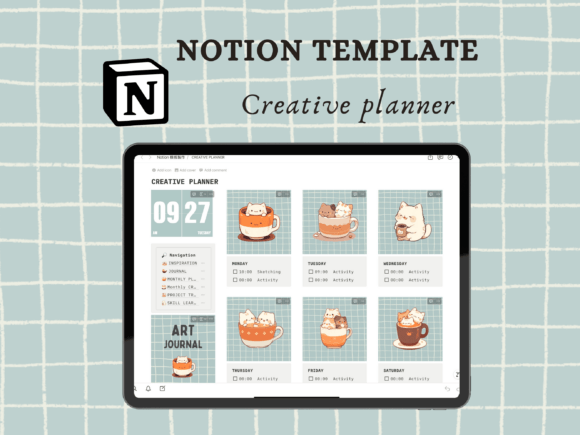
This robust template trades extreme customization for reliable, whimsical structure! It fits naturally next to a daily planner without duplicating what that planner already covers, serving purely as a cute, dedicated workspace for your passion projects.
Lily’s In-Depth Recommendation:
Hobby Organization: A brilliant place to store your digital PDF knitting patterns, craft store discount codes, and endless lists of “crafts I want to try eventually.”
Aesthetic Value: Do not change the built-in cat covers! The cohesive, illustrated aesthetic is exactly what makes this template so comforting to open.
4. Notion Social Media Content Planner

Built specifically for deep, repeat use rather than a one-time setup. This planner holds up brilliantly once the initial novelty of downloading a new template wears off, offering a sustainable system for moving content from “Idea” to “Published.”
Lily’s In-Depth Recommendation:
Asset Management: Use the internal database pages to store your finalized captions, hashtags, and the actual image files, so everything is ready for your auto-scheduler.
Agency Work: If you manage multiple client accounts, duplicate this dashboard for each brand to keep their content completely siloed and organized.
5. NOTION Creator’s Planner

A highly practical template that solves the specific problem of digital scatter. It holds up exceptionally well over time since the layout relies on clean minimalism rather than heavy decorative elements that cause the app to lag on mobile.
Lily’s In-Depth Recommendation:
Sponsorship Tracking: Built for influencers! Track your brand deals, contract terms, and required posting dates in one central command center.
Analytics Log: Keep a monthly log of your follower growth and engagement rates to present to potential brand partners.
6. Notion Template Party & Event Planner

This system is set up so you can start using it the exact same day you duplicate it, with zero heavy customization needed. A solid option if you have outgrown a plain paper checklist but do not want the burden of building event spreadsheets.
Lily’s In-Depth Recommendation:
Vendor Management: Track quotes from florists, caterers, and photographers side-by-side so you never overspend your party budget.
Guest Lists: Ditch the messy Excel file! Track RSVPs, dietary restrictions, and table assignments all in one interactive database.
7. Notion Personal Social Media Planner

Designed with fewer moving parts than a massive agency-level dashboard, making it significantly easier to actually stick with. It is a highly reasonable pick if Notion’s own built-in templates never quite matched how you process tasks.
Lily’s In-Depth Recommendation:
Personal Branding: If you are trying to grow a personal TikTok or YouTube channel alongside a full-time job, this keeps your scripting and filming days rigidly organized.
Trend Tracking: Use a dedicated sub-page to save links to trending audio and aesthetic video formats you want to recreate later.
8. Digital Product Creation Planner Notion

A brilliant template that fits seamlessly into your existing Notion setup rather than demanding you rebuild everything around it. It is simple enough to heavily customize in a single afternoon, serving purely as a launch pad for your passive income streams.
Lily’s In-Depth Recommendation:
Etsy Sellers: Track the creation of your printables, e-books, and Canva templates from initial market research all the way to writing the SEO-optimized product listing.
Course Modules: Outline the video scripts, worksheets, and slide decks required for every single module of your upcoming masterclass.
9. Notion Template Feminine Energy Planner

This focused layout is aimed at dominating your daily routine and wellness habits. It works incredibly well as a master dashboard linking to all your sub-pages. It will not take long before opening this beautifully aesthetic page becomes the favorite part of your morning!
Lily’s In-Depth Recommendation:
Self-Care Tracking: Finally stick to your skincare routines and hydration goals by checking them off in a visually rewarding tracker.
Journaling: Use the dedicated prompts to reflect on your week, track your cycle, and maintain a deeply grounding gratitude practice.
10. Youtube Planner Notion Template

Built strictly to reduce the mental overhead of remembering details manually. Not flashy, but it gets the complex job of organizing your video production pipeline done without generating extra digital clutter.
Lily’s In-Depth Recommendation:
Scripting & B-Roll: Outline your video scripts and create specific shot-lists for your B-roll so you never forget to film a crucial transition scene.
Sponsor Integration: Track exactly which talking points your sponsor requires and log the timestamps where ad integrations need to be placed during editing.
11. Digital Product Creation Notion Planner V2
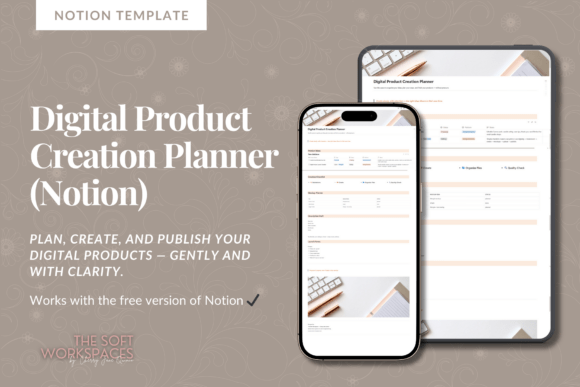
Your absolute go-to landing page for product development! This dashboard acts as the front door to your e-commerce business. It is visually welcoming and organizes your most important databases so you never have to hunt through the sidebar again.
Lily’s In-Depth Recommendation:
Asset Organization: Link your Canva templates, Google Drive folders, and final PDF exports directly into each product card so everything is housed in one click.
Launch Calendars: Stop launching products randomly! Use the timeline view to orchestrate massive holiday sales and email marketing sequences.
12. Notion Creative Planner
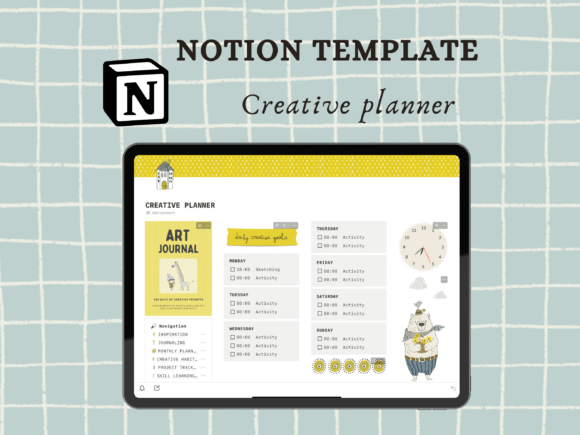
A highly focused operating system for people who prefer clean, monochromatic aesthetics. It is one of the most practical picks on this entire list if you heavily value rapid functionality over excessive database linking.
Lily’s In-Depth Recommendation:
Brainstorming: Drop your messy, chaotic midnight ideas into the “Idea Dump” before categorizing them into actionable projects the next morning.
Mood Boarding: The gallery views allow you to create stunning, organized visual mood boards for upcoming creative writing or design projects.
13. Notion Template Creator Planner

This template trades endless blank-page flexibility for rigorous, proven structure. It fits perfectly next to your daily planner, acting as the high-level project manager that keeps your long-term goals on track.
Lily’s In-Depth Recommendation:
Notion Sellers: This is very meta, but use this template to organize the launch of the Notion templates you are building to sell to other people!
Goal Breakdown: Stop feeling overwhelmed by large creative projects! Use this template to break massive goals down into actionable 15-minute tasks.
14. Wedding Planner Notion Dashboard

Built for high-stress, high-stakes organization! Worth adding to your setup immediately if you just got engaged. It is incredibly satisfying to use and keeps you from having a total meltdown over seating charts.
Lily’s In-Depth Recommendation:
Vendor Management: Track quotes from florists, caterers, and photographers side-by-side so you never accidentally overspend your wedding budget.
Guest Lists: Ditch the messy Excel file! Track RSVPs, dietary restrictions, and table assignments all in one interactive database that you can easily share with your wedding planner.
15. Notion Wedding Planner Template V2

A highly practical, aesthetic alternative to standard wedding binders. It holds up beautifully over the 12+ months of planning without buckling under the weight of complex formulas or lost sticky notes.
Lily’s In-Depth Recommendation:
Registry Tracking: Keep a running wishlist here year-round so you do not panic when relatives ask what you want for your bridal shower.
Vows & Speeches: Use the private interior pages to draft your vows or store speech ideas securely where your partner cannot accidentally read them!
16. Notion Event Planner, Notion Template

This system forces you to define timelines and budgets before you start buying balloons and confetti. A solid, necessary option if you are planning corporate events, fundraisers, or large family reunions.
Lily’s In-Depth Recommendation:
Run of Show: Build a minute-by-minute itinerary for the day of the event, ensuring speakers, catering, and entertainment all flow seamlessly.
Team Delegation: Share this page with your committee members and assign tasks via mentions so everyone knows exactly what they are responsible for.
17. Event & Party Planner (Notion Template)

A fantastic middle ground between basic to-do lists and overwhelming corporate dashboards. It is a highly reasonable pick if you want a beautiful, visual way to track kids’ birthday parties or holiday dinners without getting stressed out.
Lily’s In-Depth Recommendation:
Theme Boarding: Replace your messy Pinterest boards by embedding your aesthetic inspiration images directly alongside your actionable party-prep steps.
Menu Planning: Link recipes directly into the database so you aren’t hunting for that specific cocktail recipe an hour before guests arrive!
18. Plant and Herbs Notion Template

A robust, highly functional template that slides perfectly into any existing home-management Notion hierarchy. It is simple enough to understand instantly, yet powerful enough to manage complex watering and fertilizing schedules for an entire indoor jungle.
Lily’s In-Depth Recommendation:
Watering Schedules: Stop overwatering your succulents! Set up recurring reminders so you only water plants when they actually need it.
Growth Tracking: Take a photo of your Monstera on the 1st of every month and upload it to the gallery to document its massive growth!
19. Watercolor Plant Notion Icons

While technically a decorative asset rather than a database, this icon pack is essential for customizing the plant planners above. Aimed at a specific, cozy botanical mood, it works beautifully alongside broader life planners.
Lily’s In-Depth Recommendation:
Visual Navigation: Apply these specific hand-painted icons to the different tabs in your Notion databases to make navigation much more intuitive than reading text labels.
Habit Trackers: Use these cute plant icons to represent “Water Intake” or “Outdoor Time” in your daily habit trackers!
20. Travel Themed Notion Icons

This pro-level icon pack is built to visually organize heavy travel workflows without confusing you with unnecessary flair. It gets the specific job of labeling flight details and hotel bookings done beautifully.
Lily’s In-Depth Recommendation:
Itinerary Building: Use the airplane, train, and hotel icons to visually break up a massive text-heavy travel itinerary so you can find information at a glance.
Bucket Lists: Create a gallery view database of all the countries you want to visit, and use these icons to tag the ones you have successfully checked off!
21. My Shopping Planner – Notion Template

The ultimate command center for anyone obsessed with optimizing their budget and preventing impulse buys! It tracks everything from your weekly grocery lists to massive Black Friday wishlists, providing incredible insights into your spending habits.
Lily’s In-Depth Recommendation:
Wardrobe Planning: Track items you want to buy for your capsule wardrobe. Wait 30 days before purchasing to see if you actually still want the item!
Holiday Prep: Use the database to track Christmas gifts you have bought throughout the year, ensuring you stay under budget for each family member.
Frequently Asked Questions About Notion Templates
How do I actually install a purchased Notion template?
It is incredibly easy! Once you purchase the template, you will receive a secret web link (usually in a PDF document). Open that link in your browser, make sure you are logged into your Notion account, and click the “Duplicate” button in the top right corner. The entire system will instantly copy into your private workspace.
Do I need to pay for a premium Notion subscription to use these?
For 99% of personal use cases, absolutely not! All of the templates on this list function perfectly on Notion’s completely free Personal Plan. You only need to upgrade if you are planning to upload massive video files directly into your workspace or collaborating with a large team.
Can I customize the databases after I buy the template?
Yes! That is the beauty of Notion. You can change every single cover image, swap out the icons, recolor the text blocks, and add or delete columns to make the template fit your exact workflow needs. You are not locked into the designer’s original structure.
Final Thoughts on Digital Organization
Please remember: Not every single template on this list belongs in your workspace at the exact same time. Start with whichever one solves the specific planning problem that is causing you the most stress right now. Add the rest only once you have actually established a consistent daily habit with your current system.
A beautifully functioning workspace is a productive workspace. Happy organizing!

Written by Lily
Master Crafter & Digital Organizer
I teach creatives how to bridge the gap between messy, beautiful physical crafts and structured digital businesses. I focus on optimizing digital workspaces, organizing pattern libraries, and proving that productivity tools can be just as aesthetic as your handmade art.
Affiliate Disclosure: This post contains affiliate links to Creative Fabrica. If you click through and make a purchase, I may receive a small commission at no extra charge to you. I only recommend digital assets I trust and use daily in my own Notion dashboard.