28 Notion Templates to Scale Your Small Business and Freelance Operations
By Lily, Master Crafter & Digital Organizer
Let’s be completely honest—managing a small business or freelance operation out of scattered Google Sheets and sticky notes is a recipe for disaster. But building a cohesive CRM (Customer Relationship Management) system from scratch in Notion can take weeks of frustrating trial and error.
We dug through the current lineup of business templates on Creative Fabrica and aggressively pulled out the ones that solve real, specific operational problems rather than just looking good in an aesthetic screenshot. From comprehensive client portals and Etsy shop dashboards to advanced financial trackers, here is the full breakdown of templates that will genuinely streamline your business!

1. PLR Second Brain Finance Tracker

This template is built specifically for managing cash flow without needing an accounting degree. Because this includes PLR (Private Label Rights), this is an absolute goldmine for digital creators. You can actually modify this incredibly detailed finance system and resell it in your own shop!
Lily’s In-Depth Recommendation:
Digital Sellers: Swap out the colors and icons to match your specific brand aesthetic before listing it for sale to your audience.
Expense Tracking: Use the built-in categorizations to track your craft supply write-offs so you are fully prepared when tax season arrives.
2. Freelance Client & Project CRM

A sharply focused, practical system for freelancers who would rather track their client pipelines properly than juggle dozens of messy email threads. It is incredibly easy to adjust so it fits your own specific service pricing and client roster within a few minutes.
Lily’s In-Depth Recommendation:
Pipeline Management: Use the Kanban board to visually drag client projects from “Lead” to “Negotiation” to “Active Project.”
Asset Storage: Attach executed contracts, brand briefs, and final invoice PDFs directly into each client’s dedicated card.
3. Notion Ultimate Second Brain, Business

Built strictly with solopreneurs and small business owners in mind, avoiding the bloated, overly complex structures designed for enterprise teams with a dozen departments. It is not overly flashy, but it gets the heavy lifting of knowledge management done without generating extra digital clutter.
Lily’s In-Depth Recommendation:
SOP Creation: Use the knowledge base to write down your Standard Operating Procedures (like how to process a refund) so you never have to re-invent the wheel.
Resource Archiving: Clip web articles, marketing podcasts, and competitor research directly into the library so you never suffer from a lack of inspiration.
4. Notion Etsy Shop Dashboard Template

This template trades a general business dashboard for something highly specialized and much easier to actually keep updated. An incredibly reasonable pick if your current Etsy order spreadsheets have started feeling more like a burden than a help.
Lily’s In-Depth Recommendation:
Inventory Tracking: Keep track of exactly how much raw material (like yarn or vinyl) you have left in stock before you accept a custom bulk order.
SEO Optimization: Use the listing prep pages to draft your product titles and tags, ensuring you hit all your long-tail keywords before publishing to Etsy.
5. Notion Freelance Dashboard Hub

A sharply focused template that solves a specific operational headache instead of trying to be an all-in-one suite. It elegantly separates your active clients, pending invoices, and daily tasks into clean, distinct hubs.
Lily’s In-Depth Recommendation:
Financial Overview: Track your monthly revenue targets visually, so you know exactly how many more commissions you need to take on to hit your goals.
Time Blocking: Use the daily task manager to allocate specific hours to specific clients, ensuring you never over-promise and under-deliver.
6. CRM Tracker Notion Template

Designed to get you tracking the exact same day you duplicate it, without a long, agonizing setup process first. It fits naturally next to your existing daily planner, serving purely as a rolodex and relationship manager.
Lily’s In-Depth Recommendation:
Follow-Up Reminders: Never lose a lead again! Set a “Last Contacted” date property so you know exactly when to circle back with a potential client.
Network Tracking: Stop forgetting who you met at trade shows. Log their names, industry, and the exact context of your conversation here.
7. Notion Finance Template, Notion Planner

This system fits alongside your existing business tools rather than asking you to migrate everything into Notion at once. Worth adding if tracking income versus expenses is a task you need to deal with weekly, not just once at tax time.
Lily’s In-Depth Recommendation:
Subscription Audit: Log every single software tool and app you pay for monthly. Seeing the total cost visually often inspires a much-needed subscription purge!
Profit Margins: Use the simple formulas to calculate if the price you are charging for your handmade goods actually covers your materials and time.
8. Notion Template Business, Notion Planner

Built for heavy, repeat use week after week, not just a one-time aesthetic setup you abandon after the first month. It holds up beautifully as your business scales since the layout doesn’t rely on a fixed, inflexible number of clients or products.
Lily’s In-Depth Recommendation:
Team Delegation: Because it is so cleanly structured, it is incredibly easy to share this entire dashboard with a new hire or virtual assistant.
Goal Breakdown: Stop feeling overwhelmed by large company goals! Use this template to break massive Q4 revenue targets down into actionable 15-minute daily tasks.
9. Small Business Finance Notion Planner

A robust template aimed at solo operators and small teams who desperately need to organize their money but don’t need enterprise-level complexity. A brilliant option if you have outgrown a plain Excel spreadsheet but do not need full accounting software like QuickBooks yet.
Lily’s In-Depth Recommendation:
Receipt Storage: Take photos of your physical business receipts and attach them directly to the expense entry in Notion. It will save you hours during an audit!
Income Streams: Tag your revenue by source (Etsy, Shopify, Craft Fairs) to visually see exactly which platform is actually generating the most profit.
10. Etsy Listing Prep System Notion
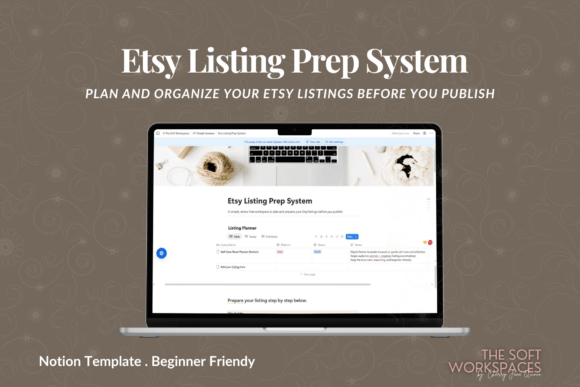
This one leans heavily into a highly specific workflow, so it works best if e-commerce is actually how your business runs! A fantastic starting point if you are setting up your first real SEO system for this part of the business.
Lily’s In-Depth Recommendation:
Keyword Banking: Store all your high-performing long-tail keywords in one place so you can easily copy and paste them into new product listings.
Photo Checklists: Create a template to ensure you remember to shoot all 10 required listing photos (lifestyle, sizing, close-up details) for every new product.
11. All-in-One Notion Branding Kit

This template is built strictly for the specific business task of organizing your brand identity. It is simple enough to customize in an afternoon, even without much Notion experience, replacing messy Google Drive folders forever!
Lily’s In-Depth Recommendation:
Asset Storage: House all your high-resolution logos, hex color codes, and brand fonts in one place so you never have to search for them when designing a new graphic in Canva.
Contractor Sharing: If you hire a freelance web designer, simply share this specific Notion page with them so they have instant access to all your brand assets!
12. Rental Property Manager – Notion Template

A highly practical system for real estate investors who would rather track their property stats properly than juggle endless messy spreadsheets. It is incredibly easy to adjust so it fits your own specific property portfolio and tenant roster.
Lily’s In-Depth Recommendation:
Maintenance Tracking: Use this to track routine maintenance schedules (like changing HVAC filters) so you never face a massive, preventable repair bill.
Tenant Portals: Create a restricted sub-page for your tenants where they can access copies of their lease, Wi-Fi passwords, and trash collection schedules.
13. PLR Finance Tracker Notion Template

Built with digital creators in mind! Not overly flashy, but it gets a highly specific business task done without extra clutter. Because it includes Private Label Rights (PLR), you can fully customize this template and resell it as your own digital product.
Lily’s In-Depth Recommendation:
Passive Income: Swap out the fonts and cover images to match your brand, export the template link, and list it on your Etsy or Gumroad store!
Lead Magnet: Use a simplified version of this tracker as a free download to aggressively build your business email list.
14. Notion Freelance OS

This one trades a general “life dashboard” for something much narrower and easier to actually keep updated. A highly reasonable pick if using multiple different apps to track invoices, client notes, and deadlines has started feeling more like a burden than a help.
Lily’s In-Depth Recommendation:
Invoice Tracking: The linked databases allow you to connect specific completed tasks directly to an invoice, ensuring you never forget to bill a client for extra revisions.
Capacity Planning: Use the timeline view to visually see how many projects overlap next month, so you know exactly when to say “no” to new work.
15. Candle Business Content Planner

A sharply focused template that solves a specific operational headache for handmade sellers instead of trying to be an all-in-one suite. It is one of the more practical picks here if you want pure inventory and marketing function over excessive decoration.
Lily’s In-Depth Recommendation:
Recipe Archiving: Store all your successful wax-to-fragrance-oil ratios here so you can perfectly recreate your best-selling autumn scents year after year.
Social Media Prep: Plan out your Instagram reels showing the pouring process, ensuring you always have content ready for launch week.
16. Notion Advanced CRM Template

Designed to get you tracking leads the exact same day you duplicate it, without a long, agonizing setup process first. It fits naturally next to your existing project planner, serving purely as a robust rolodex and relationship manager.
Lily’s In-Depth Recommendation:
Follow-Up Reminders: Never lose a warm lead again! Set a “Last Contacted” date property so you know exactly when to circle back with a potential client.
Meeting Notes: Link this database directly to your meeting notes so you can review a client’s past requests before jumping on a zoom call.
17. Notion Small Business Planner Template

This comprehensive system fits alongside your existing tools rather than asking you to migrate your entire life into Notion at once. Worth adding if tracking income, expenses, and marketing campaigns is a task you desperately need to centralize.
Lily’s In-Depth Recommendation:
Competitor Research: Use the web-clipper to save competitor pricing and marketing strategies directly into a designated research database for your next product launch.
Product Development: Track your raw material costs here so you can accurately calculate the final retail price of your handmade goods.
18. Essential Notion Branding Kit
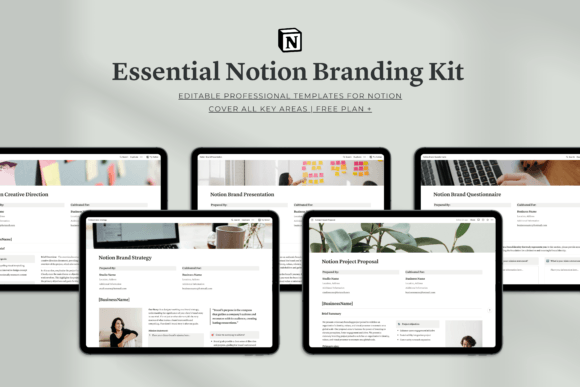
Built for heavy, repeat use week after week! It holds up beautifully as your business grows, serving as the single source of truth for all your visual assets, replacing messy Google Drive folders forever.
Lily’s In-Depth Recommendation:
Asset Storage: House all your high-resolution logos, hex color codes, and brand fonts in one place so you never have to search for them when designing a new graphic in Canva.
Contractor Sharing: If you hire a freelance web designer, simply share this specific Notion page with them so they have instant access to your entire brand identity!
19. Notion – Finance OS Tracker

A robust template aimed at solo operators and small teams who desperately need to organize their money but don’t need enterprise-level complexity. A solid, brilliant option if you have outgrown a plain spreadsheet but do not need full accounting software yet.
Lily’s In-Depth Recommendation:
Receipt Storage: Take photos of your physical business receipts and attach them directly to the expense entry in Notion. It will save you hours during an audit!
Income Streams: Tag your revenue by source (Etsy, Shopify, Craft Fairs) to visually see exactly which platform is actually generating the most profit.
20. Notion Brand Guidelines Template

This one leans into a highly specific workflow, so it works best if brand design is actually how your freelance business runs! A fantastic starting point if you are setting up your first real system for client hand-offs.
Lily’s In-Depth Recommendation:
Client Presentations: Instead of sending a static PDF, send your clients a link to this interactive Notion page where they can download their logo files directly.
Voice & Tone: Use the text blocks to clearly define your client’s brand voice, ensuring any copywriters they hire in the future stay perfectly on-brand.
21. Notion Brand Questionnaire Template

This template is built specifically for the crucial freelance task of onboarding new clients. It is simple enough to customize in an afternoon, ensuring you gather all necessary project details before you begin drafting any creative work.
Lily’s In-Depth Recommendation:
Frictionless Onboarding: Duplicate this template for every new client, and share the web link with them as a professional, interactive intake form.
Scope Creep Prevention: Getting clients to answer these deep strategy questions in writing prevents them from constantly changing their minds halfway through the project!
22. Notion Client Portal

A sharply focused, practical system for freelancers who would rather communicate with clients properly than juggle messy email threads. It elevates your perceived professionalism instantly, allowing you to charge higher rates.
Lily’s In-Depth Recommendation:
Feedback Loops: House your project mockups directly in this portal, allowing clients to leave specific, timestamped comments right inside Notion.
Invoice Hub: Attach all executed contracts and final invoice PDFs directly into the portal so the client never has to ask you to resend a lost email.
23. Aesthetic Home & Business Notion Planner

Built with work-from-home freelancers in mind! It elegantly separates your personal life routines from your client work, ensuring you maintain a healthy work-life balance while managing everything from one incredibly aesthetic screen.
Lily’s In-Depth Recommendation:
Household Management: Perfect for keeping track of meal plans and chore schedules right alongside your business marketing calendar.
Boundary Setting: Use the distinct hubs to mentally “clock out” of the business page at 5 PM and transition smoothly into the personal home dashboard.
Frequently Asked Questions About Notion Templates
How do I actually install a purchased Notion template?
It is incredibly easy! Once you purchase the template, you will receive a secret web link (usually in a PDF document). Open that link in your browser, make sure you are logged into your Notion account, and click the “Duplicate” button in the top right corner. The entire system will instantly copy into your private workspace.
Do I need to pay for a premium Notion subscription to use these?
For 99% of solo-preneurs and freelancers, absolutely not! All of the templates on this list function perfectly on Notion’s completely free Personal Plan. You only need to upgrade if you are planning to upload massive video files directly into your workspace or collaborating with a large team of employees.
Can I customize the databases after I buy the template?
Yes! That is the beauty of Notion. You can change every single cover image, swap out the icons, recolor the text blocks, and add or delete columns to make the template fit your exact business workflow needs. You are not locked into the designer’s original structure.
Final Thoughts on Digital Organization
Please remember: Not every single template on this list belongs in your workspace at the exact same time. Start with whichever one solves the specific operational problem that is causing your business the most stress right now. Add the rest only once you have actually established a consistent daily habit with your current system.
A beautifully functioning workspace is a profitable workspace. Happy organizing!

Written by Lily
Master Crafter & Business Mentor
I teach creatives how to bridge the gap between messy, beautiful physical crafts and structured digital businesses. I focus on optimizing digital workspaces, organizing pattern libraries, and proving that productivity tools can be just as aesthetic as your handmade art.
Affiliate Disclosure: This post contains affiliate links to Creative Fabrica. If you click through and make a purchase, I may receive a small commission at no extra charge to you. I only recommend digital assets I trust and use daily in my own Notion dashboard.