19 Notion Templates That Actually Solve Real Planning Problems
By Lily, Master Crafter & Digital Organizer
Let’s be completely honest—building an organizational system from scratch in Notion can feel like staring at a blank piece of paper. It is intimidating! You know the platform is powerful, but spending hours setting up relational databases and linked views takes precious time away from actually doing your work.
We dug through the current lineup of Notion planner templates on Creative Fabrica and pulled together 19 pre-built systems that actually solve real planning problems instead of just looking nice in a screenshot. From comprehensive “Second Brain” dashboards to highly focused weekly task managers, here is the full breakdown, one incredibly useful template at a time!

1. Second Brain Notion Template: Mindloom

Based on Tiago Forte’s famous productivity methodology, this template ditches chaotic note-taking in favor of a highly structured system for capturing and organizing knowledge. It is built to organize resources into Projects, Areas, Resources, and Archives flawlessly.
Lily’s In-Depth Recommendation:
Knowledge Workers: Perfect for freelancers or students who consume massive amounts of podcasts, articles, and courses and need a central hub to summarize and retrieve those insights.
Content Creators: Use the “Resources” database to stockpile content ideas and inspiration before you sit down to draft your weekly newsletters or videos.
2. Notion Project Framework Hub

A sharply focused system for people who would rather track complex projects well than manage a dozen loosely connected life-planning pages. This is one of the more practical picks on this list if you prioritize raw business function over heavy decoration.
Lily’s In-Depth Recommendation:
Client Onboarding: Use this to map out client deliverables, attach contracts, and track invoicing stages. It ensures nothing slips through the cracks when managing multiple accounts.
Team Collaboration: Because it is so cleanly structured, it is incredibly easy to share this dashboard with a virtual assistant or co-founder.
3. Notion Project Planner

This robust template trades extreme customization for reliable structure, which works heavily in its favor if you want an out-of-the-box solution for tracking tasks and deadlines. Fits naturally next to a daily habit planner without duplicating what that planner already covers.
Lily’s In-Depth Recommendation:
Product Launches: Perfect for small business owners preparing for a seasonal collection drop. Use the timeline views to track design, manufacturing, and marketing milestones.
New Notion Users: If you are overwhelmed by building databases, this template provides a masterclass in how a well-structured task manager should look and function.
4. Notion Project and Task Tracker Template

Built specifically for deep, repeat use rather than a one-time aesthetic setup. This planner holds up brilliantly once the initial novelty of downloading a new template wears off, offering a sustainable system for moving tasks from “To-Do” to “Done.”
Lily’s In-Depth Recommendation:
Kanban Organization: Utilize the board view to visually drag and drop your daily assignments. It is incredibly satisfying to move a card to the “Completed” column!
Household Management: Excellent for keeping track of meal plans, chore schedules, and family budgets all in one central command center.
5. Notion Life OS Template

A highly practical, aesthetic “Operating System” that solves the specific problem of digital scatter. It holds up exceptionally well over time since the layout relies on clean minimalism rather than heavy decorative elements that cause the app to lag on mobile.
Lily’s In-Depth Recommendation:
Goal Setting: Use the built-in vision boards and milestone trackers to break massive New Year’s resolutions down into bite-sized daily habits.
Personal Growth: The integrated reading lists and podcast trackers make it an excellent hub for organizing your self-improvement resources.
6. Getting Things Done Notion Template
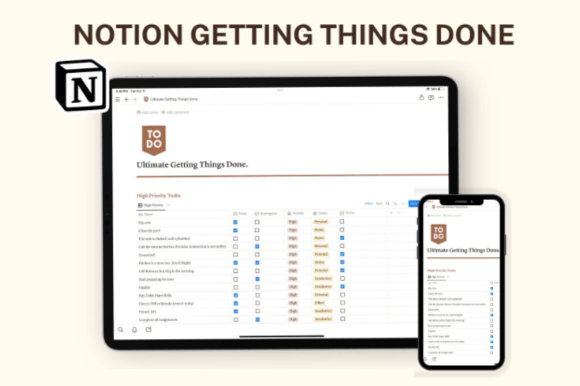
Based on David Allen’s famous GTD methodology, this system is set up so you can start using it the exact same day you duplicate it, with zero heavy customization needed. It is a solid option if you have outgrown a plain paper checklist.
Lily’s In-Depth Recommendation:
Inbox Capture: Use the “Inbox” feature to dump all random thoughts and tasks out of your brain immediately, ensuring you never forget an important idea.
Weekly Resets: Schedule a specific time every Sunday to use this template for clearing out old tasks and organizing the upcoming week with intention.
7. Getting Things Done (GTD) Notion Template V2

A slightly more aesthetic take on the GTD method. Designed with fewer moving parts than a massive “Second Brain,” making it significantly easier to actually stick with long-term. It is a highly reasonable pick if Notion’s own built-in templates never quite matched your workflow.
Lily’s In-Depth Recommendation:
Context Tagging: Use the tagging system to sort tasks by context (e.g., @computer, @errands, @phone) so you only see the tasks you can actually complete in your current location.
Creative Hobbies: Excellent for keeping track of your yarn stash, current knitting projects, and upcoming craft fairs!
8. The Ultimate Idea Vault NOTION TEMPLATE

A brilliant template that fits seamlessly into your existing Notion setup rather than demanding you rebuild everything around it. It is simple enough to heavily customize in a single afternoon, serving purely as a repository for your best ideas.
Lily’s In-Depth Recommendation:
Writers & Authors: Stop losing your brilliant late-night plot ideas on random sticky notes! Use this vault to categorize character arcs, world-building lore, and dialogue snippets.
Gift Planning: Create a database inside the vault to secretly track gift ideas for your family members year-round.
9. Life OS Notion Template

This focused layout is aimed at dominating your daily routine and habits. It works incredibly well as a master dashboard linking to all your sub-pages. It will not take long before opening this page becomes the favorite part of your morning coffee routine.
Lily’s In-Depth Recommendation:
Morning Routines: Build out your ideal checklist—tracking hydration, meditation, and reading before looking at toxic social media feeds.
Micro-Journaling: Includes space for quick, daily gratitude entries that do not require writing a whole essay.
10. Execution System Lite – Notion Task Manager

Built specifically to reduce the mental overhead of remembering minor details manually. It is not overly flashy or burdened with heavy graphics, but it gets the complex job of organizing your deadlines done without generating extra digital clutter.
Lily’s In-Depth Recommendation:
Time Blocking: Use this to adopt the Pomodoro technique or strict time-blocking to cure procrastination during your workday.
Freelancers: Use the minimalist layout to separate your personal life from your client work, ensuring you maintain a healthy work-life balance on one screen.
11. Aesthetic Pink Second Brain Notion

Who says productivity has to be boring? Your absolute go-to landing page, featuring a beautifully cohesive, highly feminine pink aesthetic! This dashboard acts as the front door to your entire digital life, ensuring you never have to hunt through the sidebar again.
Lily’s In-Depth Recommendation:
Aesthetic Workspaces: This template is pre-loaded with gorgeous matching icons and covers. Do not change them—the cohesive look is what makes it so calming to use!
Quick Links: Consolidate all your frequently visited URLs, Spotify playlists, and active project pages into the front-and-center widget board.
12. SuperSimple Task Manager Notion Template

A highly focused operating system for people who prefer clean, straightforward checklists. It is one of the most practical picks on this entire list if you heavily value rapid functionality over excessive database linking.
Lily’s In-Depth Recommendation:
ADHD Friendly: The lack of visual clutter makes this an incredible template for anyone easily overwhelmed or distracted by complex dashboards.
Brain Dump Integration: Connect this list to a simple mobile shortcut on your phone screen so you can capture tasks while on the go.
13. Notion Project Proposal Template

If you are a freelancer managing clients directly through Notion portals, this is an absolute lifesaver. It provides a clean, highly professional layout for outlining project scopes, deliverables, and terms of service before you begin drafting any creative work.
Lily’s In-Depth Recommendation:
Client Handoffs: Duplicate this template for every new client, fill in their specific project details, and share the web link with them as a professional, interactive proposal.
Portfolio Linking: Embed your past work and case studies directly into the proposal to increase your chances of landing the gig!
14. Notion Password Manager Pro

Built for essential utility! Worth adding to your setup immediately if forgetting login credentials is a daily frustration. It is highly structured to securely organize all your digital access points in one place.
Lily’s In-Depth Recommendation:
Security Note: While Notion is secure, I always recommend using this template for tracking non-critical passwords (like craft store logins or streaming services) rather than your primary banking passwords.
Subscription Tracking: Finally figure out exactly how much you are spending on Netflix, software tools, and craft box subscriptions every month by linking them here!
15. GTD Aesthetic Productivity Notion Plan

A gorgeous, highly practical template that solves the specific problem of dropped deadlines while remaining visually stunning. It holds up beautifully over time since the layout is designed for the “Getting Things Done” workflow framework.
Lily’s In-Depth Recommendation:
Deadline Filtering: Set up a custom view that only shows tasks due within the next 48 hours to eliminate feeling overwhelmed by a massive backlog.
Recurring Tasks: Perfect for tracking monthly household maintenance, bill payments, and recurring business subscription renewals.
16. Notion Resource Library Hub

This system forces you to organize your digital hoarding into a clean, searchable database. A solid, necessary option if you have outgrown a plain browser bookmark folder and need serious accountability for your reading list.
Lily’s In-Depth Recommendation:
Pattern Libraries: If you are a knitter or crocheter, use this database to store all your PDF patterns, tagged by yarn weight and garment type!
Read-It-Later: Install the “Notion Web Clipper” extension on your browser and send interesting articles directly into this library hub with one click.
17. Notion Template Organizer

A fantastic middle ground between basic to-do lists and overwhelming corporate dashboards. It is a highly reasonable pick if you want a beautiful, visual way to track your long-term assets and organize your other downloaded Notion templates!
Lily’s In-Depth Recommendation:
Digital Product Sellers: Use this to organize the templates you create before listing them for sale on Etsy or Gumroad.
Workspace Cleanup: Move all those random, unused templates sitting in your sidebar into this archive database to instantly declutter your workspace.
18. Notion Sticky Notes Dashboard

Designed for visual thinkers who treat their workspace as a creative brainstorming zone! This template brings the analog feeling of physical sticky notes right onto your screen, making brain-dumping feel highly intentional.
Lily’s In-Depth Recommendation:
Kanban Alternative: If standard Notion kanban boards feel too restrictive, this free-form sticky note template is the perfect visual alternative for moving ideas around.
Pattern Drafting: Use this template to map out new crochet patterns visually before you start writing out row-by-row instructions.
19. Calendar Notion Icons and Notion Covers

While this is technically an aesthetic pack rather than a full database, it is an essential addition for customizing the calendars inside your planners. It provides both icons AND covers, guaranteeing your schedule looks entirely unified.
Lily’s In-Depth Recommendation:
Database Views: Apply these specific calendar icons to the different “Views” tabs in your Notion databases to make navigation much more intuitive.
Content Planning: Pair these graphics with your social media content calendar so you actually feel inspired to open it and post on schedule!
Frequently Asked Questions About Notion Templates
How do I actually install a purchased Notion template?
It is incredibly easy! Once you purchase the template, you will receive a secret web link (usually in a PDF). Open that link in your browser, make sure you are logged into your Notion account, and click the “Duplicate” button in the top right corner. The entire system will instantly copy into your private workspace.
Do I need to pay for a premium Notion subscription to use these?
For 99% of personal use cases, absolutely not! All of the templates on this list function perfectly on Notion’s completely free Personal Plan. You only need to upgrade if you are planning to upload massive video files directly into your workspace or collaborating with a large team.
Can I customize the databases after I buy the template?
Yes! That is the beauty of Notion. You can change every single cover image, swap out the icons, recolor the text blocks, and add or delete columns to make the template fit your exact workflow needs. You are not locked into the designer’s original structure.
Final Thoughts on Digital Organization
Please remember: Not every single template on this list belongs in your workspace at the exact same time. Start with whichever one solves the specific planning problem that is causing you the most stress right now. Add the rest only once you have actually established a consistent daily habit with your current system.
A beautiful, functioning workspace is a productive workspace. Happy organizing!

Written by Lily
Master Crafter & Digital Organizer
I teach creatives how to bridge the gap between messy, beautiful physical crafts and structured digital businesses. I focus on optimizing digital workspaces, organizing pattern libraries, and proving that productivity tools can be just as aesthetic as your handmade art.
Affiliate Disclosure: This post contains affiliate links to Creative Fabrica. If you click through and make a purchase, I may receive a small commission at no extra charge to you. I only recommend digital assets I trust and use daily in my own Notion dashboard.